DOB NOW Account Setup Guide for NYC Building Owners
Your plumber just finished your Local Law 152 gas piping inspection and asked for "your NYC.ID email." If you've never used DOB NOW before, that request can stall everything. Without an account, you can't sign the certification, and without your signature, the filing can't go through.
Good news: setting up the account takes about 10 minutes, and you only do it once. At Above & Beyond Plumbing & Heating, we walk owners through this all the time, so we turned the city's official owner registration steps into the guide below. Keep it open next to the DOB NOW site and tap each step as you go.
Before you start, have these ready
Why Building Owners Need a DOB NOW Account
DOB asks building owners, building managers and owner representatives to register an email address in DOB NOW. That way, you can give the email to a licensed professional, such as your plumber, who uses it to link you to a filing in DOB NOW: Safety or DOB NOW: Build. The same login also lets you submit a Certificate of Correction review request in DOB NOW: BIS Options.
For Local Law 152, this matters more than ever. Since July 27, 2026, every gas piping certification goes through DOB NOW: Safety, and the owner has to log in and attest to it personally. The login runs on NYC.ID, the city's single sign-on account, which DOB has required for DOB NOW since June 3, 2024.
One account covers everything. You can manage all the buildings you own or manage with a single NYC.ID, and the same login works for boiler, elevator and facade filings too. If you want the full picture of what LL152 requires, start with our Local Law 152 gas piping inspection guide.
Quick note: NYC.ID is not the same as IDNYC. IDNYC is the city's photo ID card. NYC.ID is just an online login.
How to Set Up Your DOB NOW Account in 6 Steps
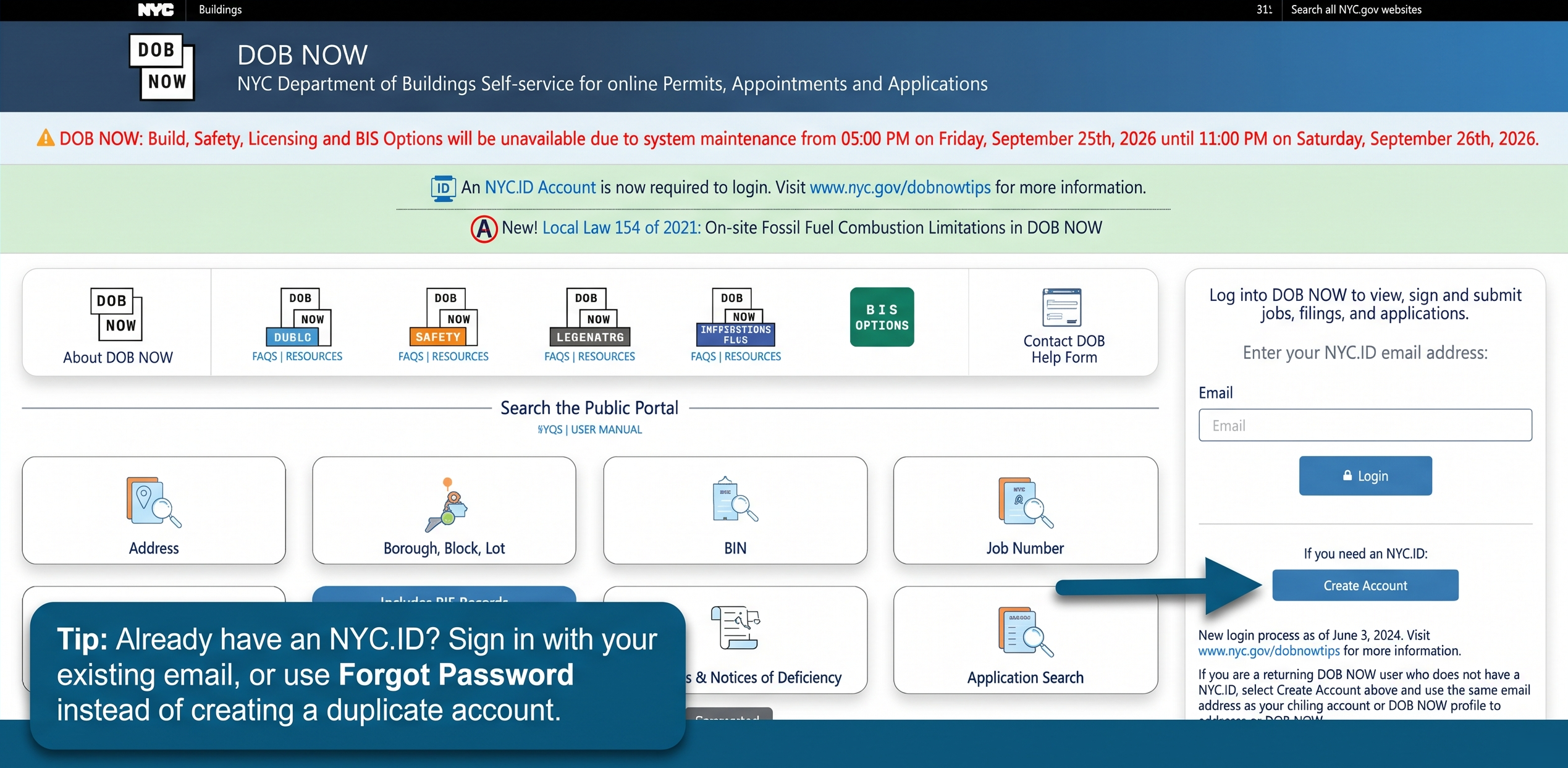
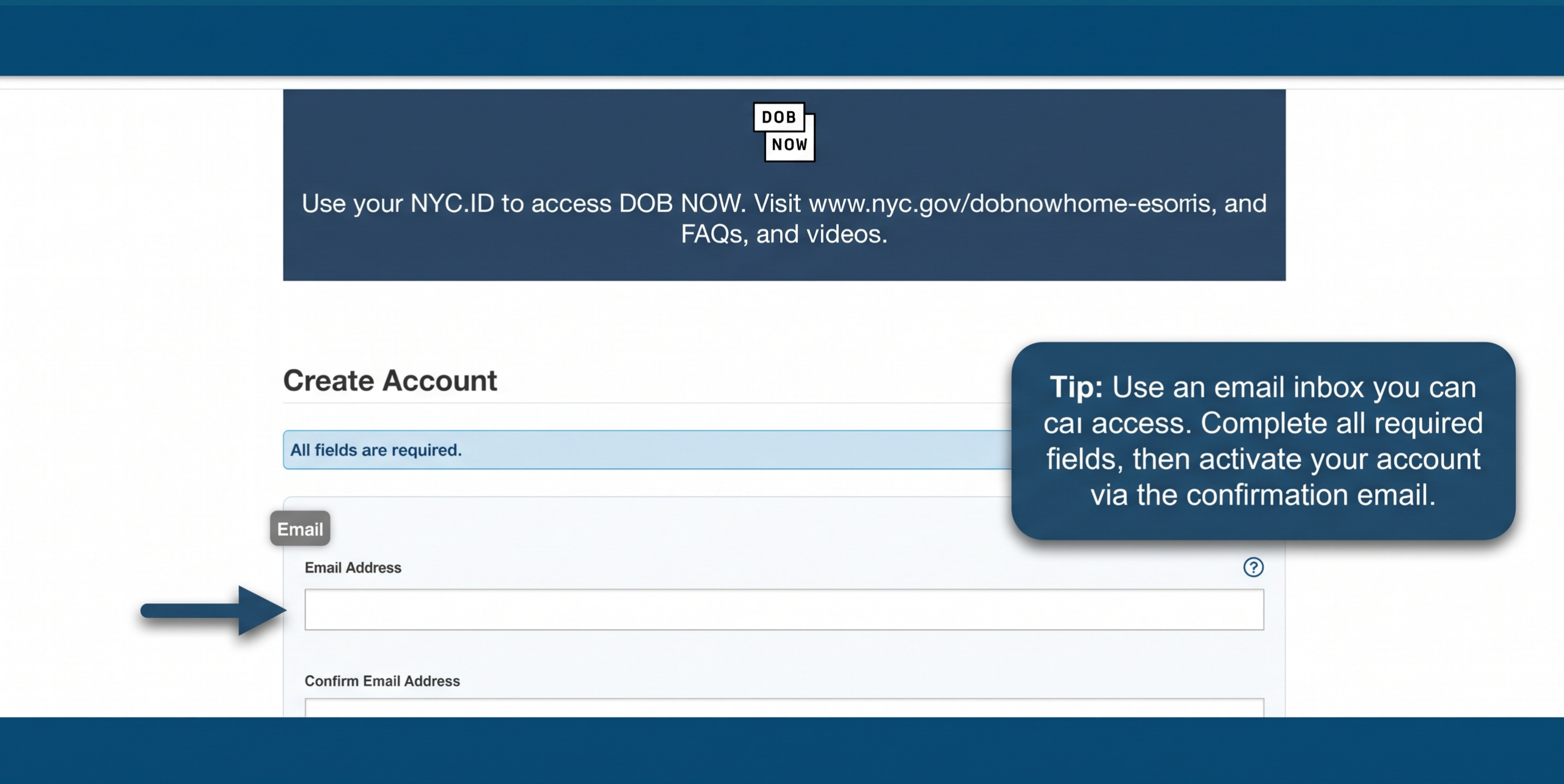
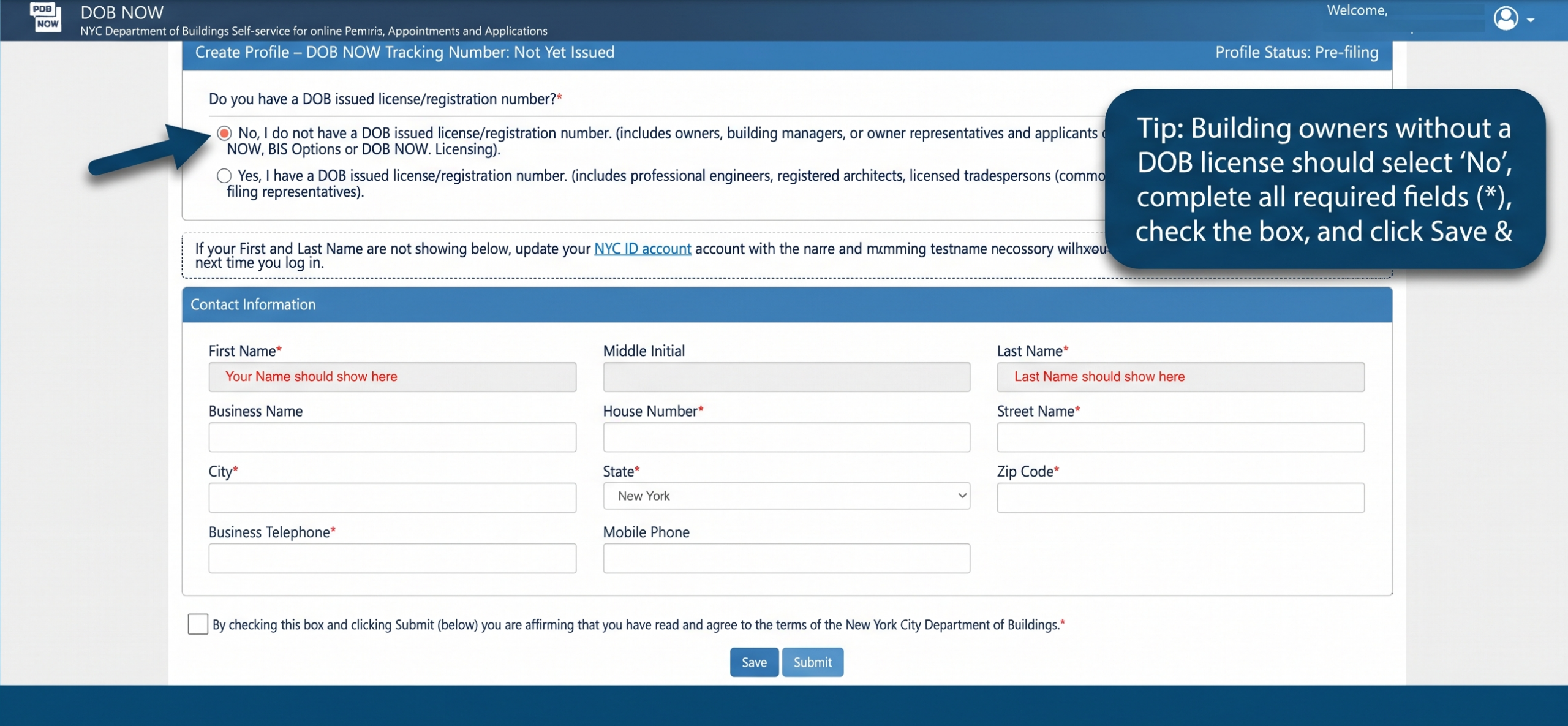
These steps follow DOB's official DOB NOW Account Registration for Building Owners tip sheet. Tap a step to open it.
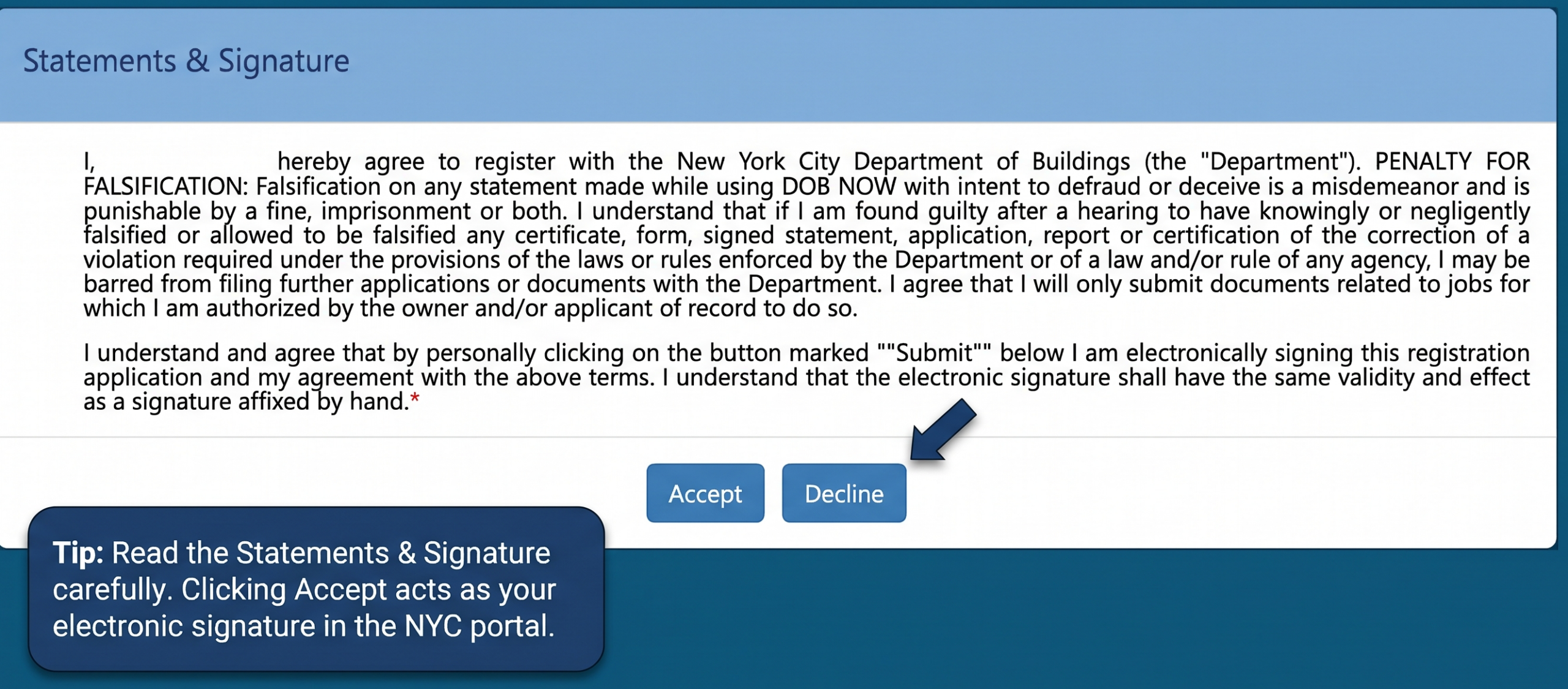
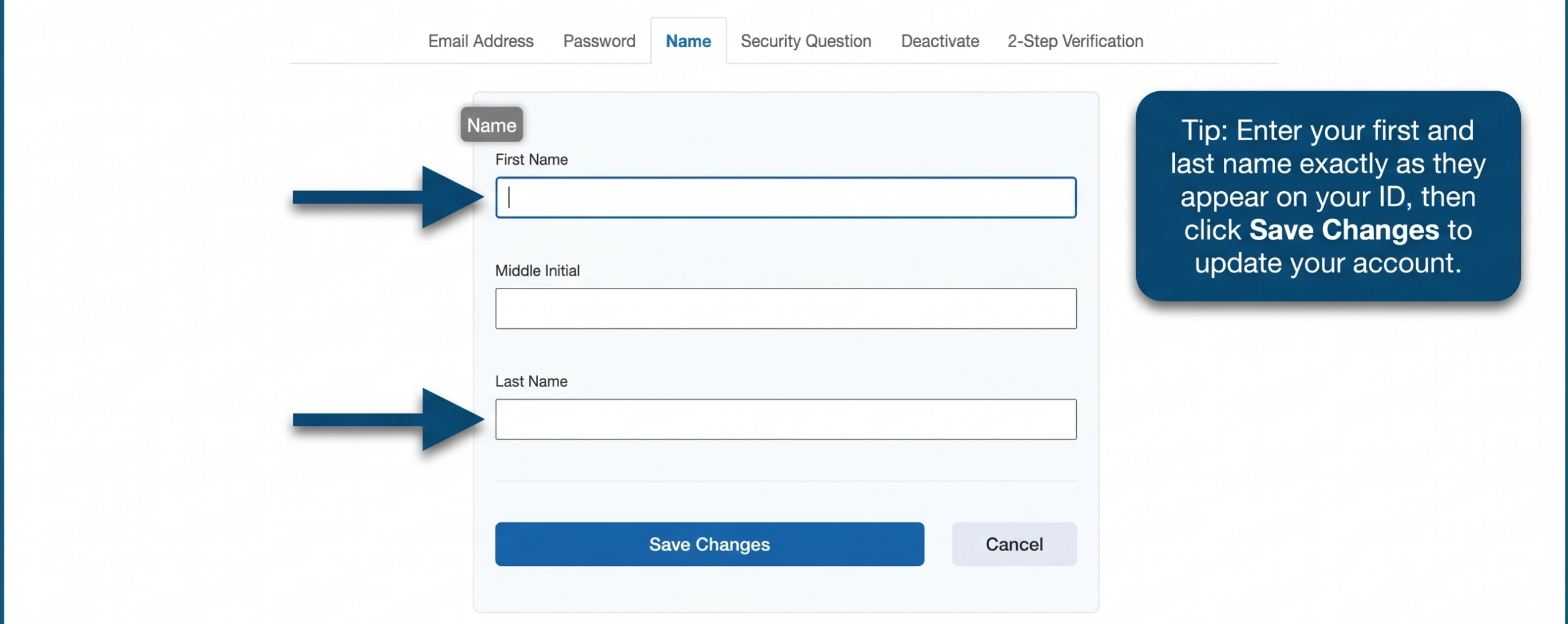
What to Do After Your Account Is Active
Your account alone doesn't file anything. Instead, it lets your plumber connect the LL152 filing to you. Once they enter your NYC.ID email in the Owner section of the filing, it shows up on your DOB NOW dashboard, ready for your review. Only a NYC Licensed Master Plumber, or a qualified journeyman under one, can perform an LL152 inspection, which is one more reason to choose a licensed master plumber and to read up on NYC plumbing codes and compliance.
From there, follow our LL152 final filing guide to review, sign, pay and submit the certification. It works the same way whether your building is in Brooklyn, Queens or any other borough we cover on our service areas page.
Troubleshooting Common DOB NOW Login Problems
"My email isn't recognized on the filing"
Usually, the plumber has a different address than the one you used for NYC.ID, or you haven't finished your DOB NOW profile in step 6. Confirm the exact email with your plumber, including typos and work-versus-personal accounts.
"I already have an NYC.ID from another city service"
Great, you can reuse it. In step 1, DOB NOW sends you to the NYC.ID login page instead of registration. Sign in, and if it's your first time in DOB NOW, you'll go straight to creating your profile.
"I manage the building for the owner"
Building managers and owner's representatives register the same way and also choose the "No license" option. Even so, the filing still needs the owner's information, so check with your plumber about whose email goes where. If you handle several properties, our property management plumbing services can help keep every building's filings in order.
"Something on the site is broken"
For registration questions, DOB points owners to nyc.gov/dobnowtips, or you can submit a question at nyc.gov/dobhelp. DOB also publishes the NYC.ID New Users Guide for non-licensees and the NYC.ID for DOB NOW FAQs.
Keep it private: Never share your NYC.ID password or verification codes with anyone, including your plumber. We only ever need your email address.
DOB NOW Account FAQs
Do I need a separate account for each building?
No. A single NYC.ID account can manage every building you own or manage.
Does creating an account cost anything?
No, setting up NYC.ID and your DOB NOW profile is free. You only pay filing fees, such as $35 for an LL152 certification on a building with gas service.
Does setting up the account submit my LL152 filing?
No. It only creates your login. You still need to review, attest and submit the certification once your plumber prepares it.
Is DOB NOW: Inspections the same login?
No. DOB NOW: Inspections uses a separate registration. For LL152, you need DOB NOW: Safety, which runs on NYC.ID.
What if I didn't authorize a filing on my building?
Report it right away through DOB's help form at nyc.gov/dobhelp so DOB can investigate.
Stuck on a Step?
Above & Beyond Plumbing & Heating is a NYC Licensed Master Plumber, License #2403. If you booked your gas piping inspection with us, call and we'll help match your account to your filing. We also handle boiler inspections and violation removals that use the same DOB NOW login.
WE OFFER 24/7 EMERGENCY SERVICE, 365 DAYS A YEAR.
Call (718) 484-4911 for Emergency Plumbing in ALL 5 BOROUGHS
Plumbing and heating issues are unpredictable. Therefore, our expert plumbers are standing by 24 hours a day, 7 days a week for plumbing and heating emergencies. Whether it’s for a residential or commercial property, we are here for you!
Brands We Service, Install & Repair:













Our Reviews

“We had a gas leak in our home which we needed help fixing. A friend recommended Mike, the recommendation was on point. Mike and his team were great! They did a great job and left no mess behind. I feel a lot safer now after Mike’s help.”
- Andre R.Recommended by a neighbor and I’m happy to recommend them to you. My boiler went out late Friday evening going into a very cold weekend – so no heat and hot water on the horizon. Above & Beyond to save the day! Their emergency service was responsive, fast, and a…
- James PattersonMy wife and I have worked with Above & Beyond for more than three years now, with two properties’ plumbing and heating needs, both regular maintenance and emergencies. Mike, his onsite teams, and the office staff have consistently been a pleasure to work with: excellent communication, professional, prompt, superb quality,…
- Ted Lee